How to Point Your Domain to Your NameCrane DirectAdmin Hosting
Last updated Changelog
On this page
To show your website and get your email on NameCrane, your domain needs to point to us. You do this where the domain is registered, in one of two ways:
| Way | What you change | Best for |
|---|---|---|
| Nameservers (recommended) | The domain’s nameservers, to ours | Most people. We look after all your DNS, so your website, email and free SSL work without any more setup. |
| A records | One or two DNS records at your current DNS provider | Keeping your DNS somewhere else, for example because other services depend on it. |
Find our details in DirectAdmin
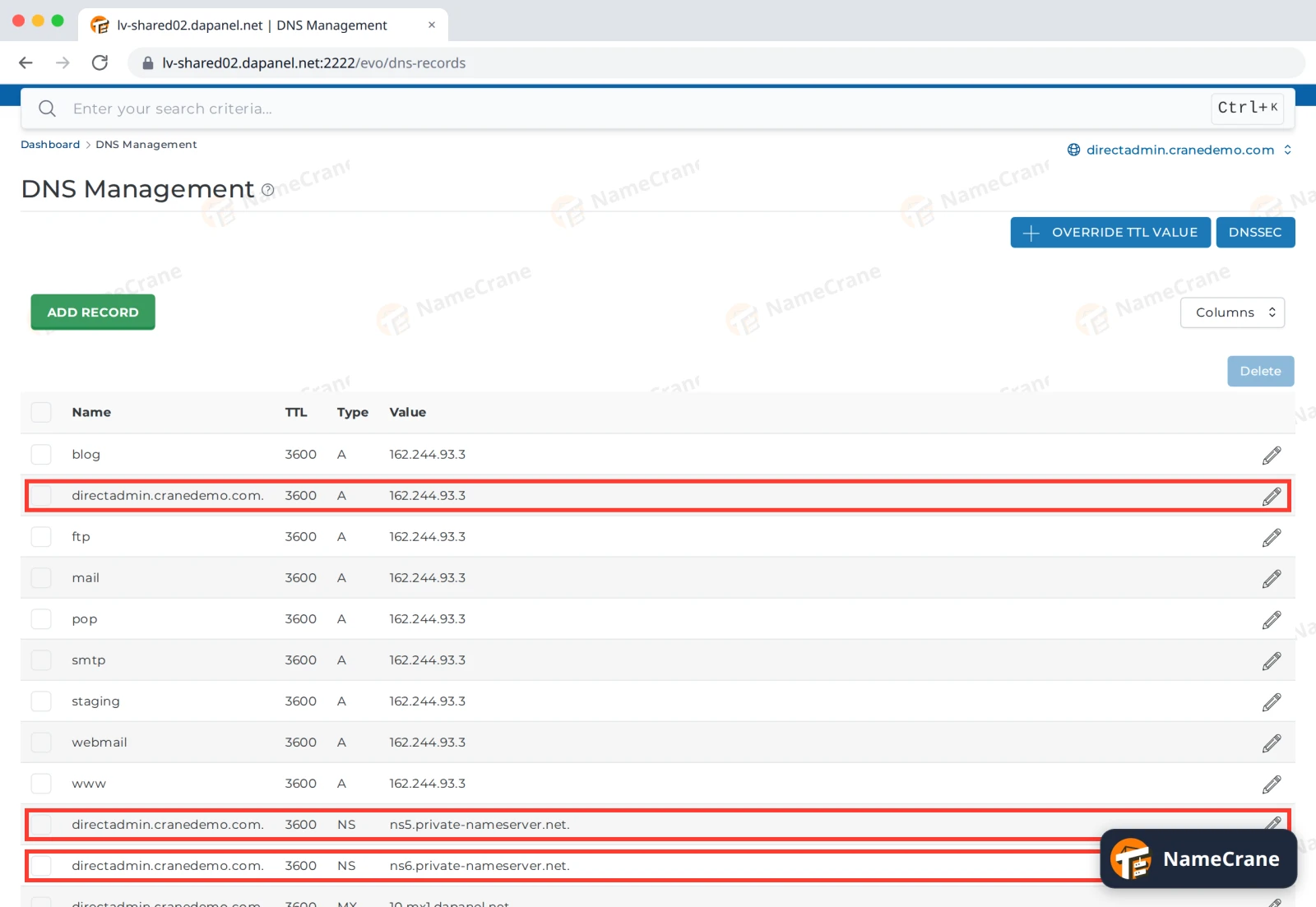
Open DNS Management for your domain. Two kinds of records tell you what you need:
- The A record for your domain itself shows your server’s address. Here it’s
162.244.93.3. - The NS records show your nameservers. On our DirectAdmin servers they’re ns5.private-nameserver.net and ns6.private-nameserver.net. If your hosting company gave you other nameservers in your welcome email, use those.
Way 1: change your nameservers
- Log in where your domain is registered and find its nameservers (sometimes called DNS servers).
- Choose custom nameservers and replace the current ones with ours:
ns5.private-nameserver.netns6.private-nameserver.net
- Save. Your email and website follow automatically once the change has spread.
Way 2: add A records
At your current DNS provider, set these records, using the address from your A record:
| Name | Type | Points to |
|---|---|---|
@ (your domain itself) |
A | your server’s address, such as 162.244.93.3 |
www |
A | the same address |
If you also want your email with us, copy the MX, SPF (TXT) and DKIM records from DNS Management to your DNS provider. See Set up SPF, DKIM and DMARC.
After the change
- Changes usually show within a few hours, but can take up to 48 hours to reach everyone.
- To check, run
dig +short NS yourdomain.com(Way 1) ordig +short yourdomain.com(Way 2), or look your domain up at whatsmydns.net. - Once the domain points to us, you can get its free SSL certificate. See Turn on free SSL.
Note: The domain must be on your hosting account too. If it isn’t your main domain, add it first. See Add another domain.
Troubleshooting
| Problem | What to do |
|---|---|
| My site still shows the old host | The change hasn’t reached your computer yet. Wait a few hours, or check from your phone on mobile data. |
| My website works but email doesn’t | With Way 2, check you copied the MX records. With Way 1, wait for the change to finish spreading. |
| My browser says the site isn’t secure | Get the free SSL certificate once the domain points to us. See Turn on free SSL. |
Snagged on something? Contact support and we’ll get you sorted.